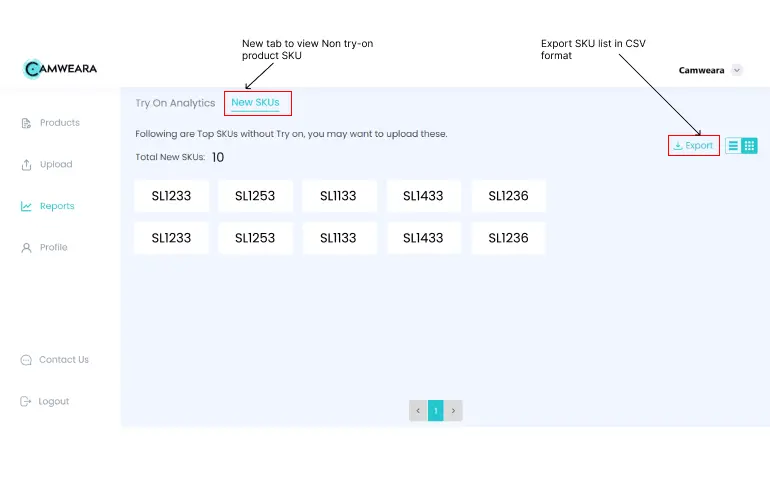
1. Report of new skus without try-on
Over the period of months, finding out the new products without try on option gets difficult and time consuming. So we launched a new feature on camweara dashboard, it automatically find products that do not have virtual try-on on your website and export them in a CSV file format. This helps you easily get the list of products to edit and upload to camweara dashboard.
- Change default finger for rings
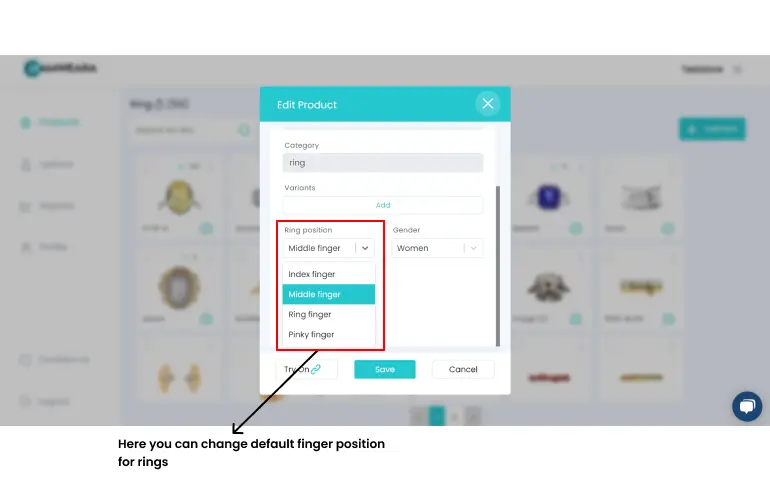
We know that some rings are designed to be worn only on the pinky finger or index finger. In such cases, you can login to camweara dashboard, click on edit, change the finger option and save. It will automatically reflect the changes on Camweara application. This helps customers to get a realistic experience of ring try on.
- Swipe to switch the finger or move the position of a product

A feature that allows users to swipe to switch the finger or move the position of a product in live mode and photo mode can provide a more immersive and interactive experience for users. In live mode, this feature could allow users to see how a product looks on their own fingers in real-time, allowing them to get a better sense of how it will fit and look on them before making a purchase. In photo mode, this feature could allow